IPv6
IPv6 header:
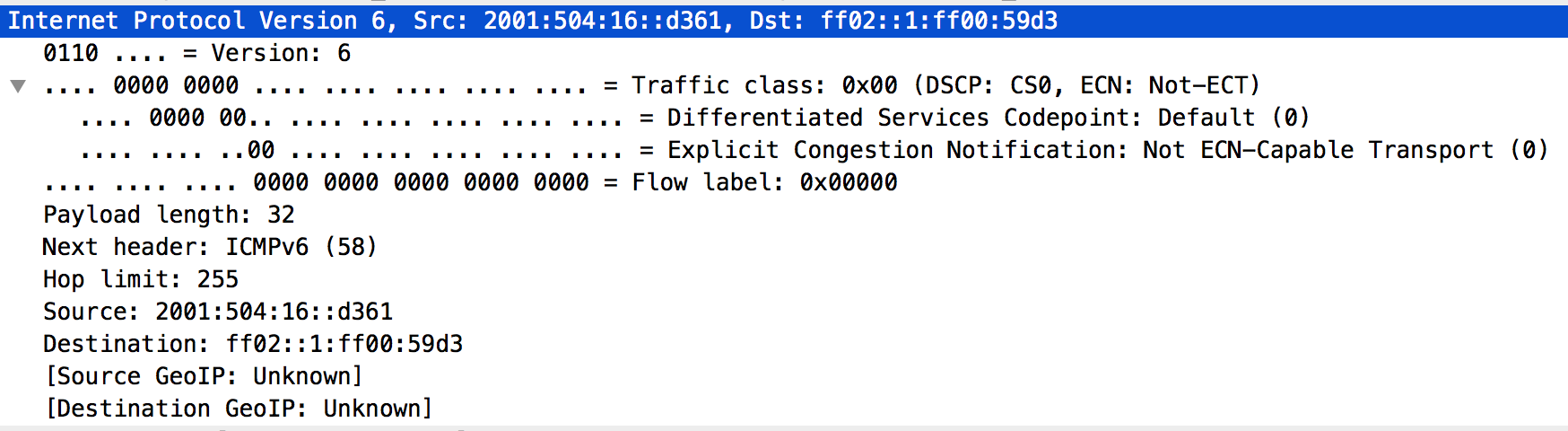
- Version (4 bits): IP version. Always 6.
- Traffic class (8 bits): Used for QoS. Like the TOS field in IPv4. RFC 2474.
- Flow label (20 bits): Used for packet labelling, End-to-end QoS. RFC 3697.
- Payload length (16 bits): Length of the payload following the header in bytes. Limits the packet size to 64 KB.
- Next header (8 bits): Following header or protocol. Like protocol type field in IPv4.
- Hop limit (8 bits): Number of hops until the packet gets discarded. TTL in IPv4.
- Source address (128 bit): IPv6 source address.
-
Destination address (128 bits): IPv6 destination address.
-
Extension headers - Optional. Hop-by-hop options, destination options, routing, fragment, AH/ESP (IPSec)
-
No checksums in IPv6 (handled by upper-layer protocols already)
- Fragmentation is handled in an extension header. Intermediate routers no longer fragment packets and is performed at the source node. Uses ICMPv6 "path-too-big" messages to determine if fragmentation is required.
-
No concept of broadcasts (unicast, multicast and anycast only)
-
"Octet" in IPv4 notation is analagous to a "hextet"/"quad nibble" in IPv6. A hextet is made up of 4 nibbles.
Address Types
fc00::/7is unique local address. Equivalent of a private IPv4 RFC1918 address.- Global Unicast is the equivalent of a public IPv4 address. Comes from
2000::/3or any address starting with001in binary ::1is localhost::/0is "unspecified". Used for default route.- IPv4-compatible . First 96 bits are zeroes. Ex:
::d190:4e71. Every two nibbles is equivalent to an IPv4 octet. - Multicast
FF00::/8Ex:ff02::1is "all nodes" (link-local),ff02::2is "all routers" (link-local)
d1 = 209
90 = 144
4e = 78
71 = 113
- Solicited Node Multicast - address formed by taking the low-order 24 bits of an address (unicast or anycast) and appending those bits to the prefix
FFO2:0:0:0:0:1:FF00::/104
Example IPv6 global address - 2001:db8::ab:1

Low order 24 bits:
::AB:1

Append ::ab:1 to ff02:0:0:0:0:1::ff00::/104

FF02:0:0:0:0:1:FFAB:1 or :FF02::1:FFAB:1
Easier to remember:
ff02::1:ff

Link Local: fe80::5aac:78ff:fe 93:da00
Solicited Node Multicast: ff02::1:ff 93:da00
Ethernet muticast mac: 33-33-ff- 93-da-00
solicted-node multicast is not the full 64-bit interface ID
EUI-64
- Extended unique identifier (EUI)
- RFC4921
Convert a 48 bit mac can be converted to a 64 bit interface ID as follows
Example MAC -  00:0f:f7:c4:9c:90

Insert ff:fe in the middle - 00:0f:f7:ff:fe:c4:9c:90

The U/L (universal/local)  bit is set to 1 if universally unique (as a MAC address is).
This is the 7th bit in the 48 bit mac address so 00 in binary is:
00000000
becomes:
00000010  which is equal to 2 in decimal

EUI-64 becomes:
02:0f:f7:ff:fe:c4:9c:90
To convert the example above to an IPv6 address (link local):
FE80::020f:f7ff:fec4:9c90
SLAAC Notes
Uses duplicate address detection (DAD) to determine if self-assigned address is not in use. Works by sending a neighbor solicitation (NS) for the assigned address. If a Neighbor Advertisement (NA) is received it means the address is in use.
ICMPv6
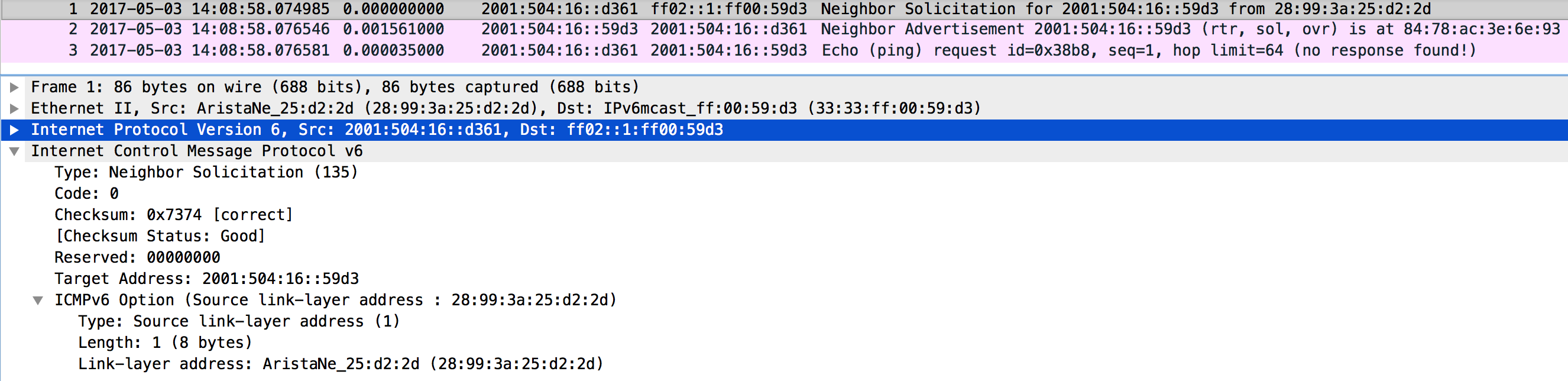
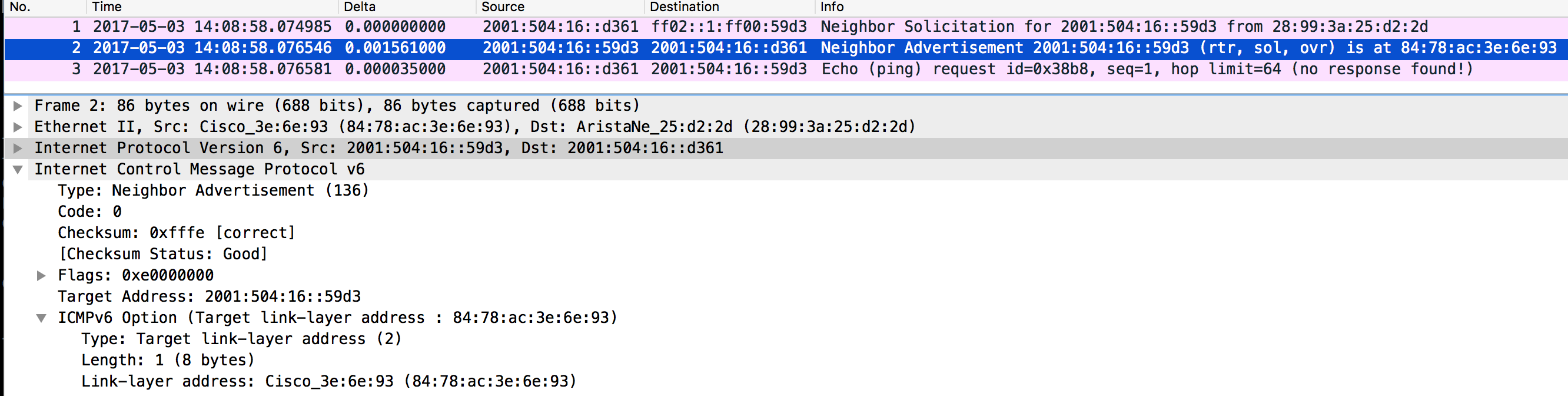
There are now broadcasts or ARP in IPv6. IPv6 uses Neighbor Solicitations and Neighbor Advertisments (part of ICMPv6) in place of ARP:
Neighbor solicitation:
Neighbor Advertisement:
NAT64
- Translate v6 address to v4
- Previously used NAT-PT (protocol translation)
Stateful vs stateless - Stateless - embeds v4 address into v6 resulting in one-to-one mapping - Stateful - overloading (similar to PAT)
Tunnels
Manual tunnel
int tunnel 0
  ipv6 address 2001:0:1:5::1/64
  tunnel source 192.168.1.1
  tunnel destination 192.168.7.1
  tunnel mode ipv6ip
6-to-4
Similar to manual tunnel but set up automatically (2002::/16)
Ex: 2002:C0A8:501::/48 where C0A8:0501 is the same as 192.168.5.1
Teredo
Tunnel un IPv4 UDP. NAT traversal works.
ISATAP
Static routes
ipv6 route 2001::/126 2000::2
OSPFv3
- OSPFv3 allows a single link to be part of multiple ospfv3 instances
- Uses IPv4 router ID even for v6-only (similar to how ISIS requires a CLNS address)
224.0.0.5isff02::5224.0.0.6isff02::6- Uses link-local addresses as source of advertisements/hellos.
- Auth not built into OSPFv3 header like it was in OSPFv2
- OSPFv3 has an "instance id" field in its header, so multiple OSPFv3 process can run over the same link.
- Routes previously carried in type-1 and type-2 LSAs have been moved to type-8 (Link-LSA) and type-9 (Inter-area prefix LSa)
Config
(config)# ipv6 cef
(config)# ipv6 unicast-routing
(config)# ipv6 router ospf 1
(config-rtr)# router-id 5.5.5.5
(config-rtr)# area 1 range FC00:1:1:2000::/58
(config)# int fa0/0
(config-if)# ipv6 ospf 1 area 0
(config-if)# ipv6 ospf priority 20
(config-if)# ipv6 ospf cost 5
Stub area:
(config)# ipv6 ospf router 1
(config-rtr)# area 14 stub
Virtual-link (to router-id [ipv4 addr]):
(config)# ipv6 router ospf 1
(config-rtr)# area 34 virtual-link 4.4.4.4
Note that in the above area 34 is the area the virtual-link is traversing
Commands
show ipv6 ospfshow ipv6 ospf neighbor detailshow ipv6 ospf interfaceshow ipv6 route ospfshow ipv6 ospf border-routershow ipv6 ospf virtual-linkping ipv6
EIGRP for IPv6
- Neighbors use link local (just like OSPFv3) even if global unicast is configured on an interface.
- Same admin distances as EIGRP
FF02::10
Example conf
(config)# ipv6 unicast-routing
(config)# ipv6 router eigrp 100
(config-router)# eigrp router-id 1.1.1.1
(config-router)# default-metric 1000000 10 255 1 1500
(config)# int gig 0/0
(config-if)# ipv6 eigrp 100
Commands
show ipv6 eigrp neighbor
show ipv6 eigrp topology
RIPng
- Multicasts to
FF02::9(UDP port 521) - Based on RIPv2 (hop count metric, maximum hop count of 15, multicast updates every 30 seconds)
Config
(config)# int lo 0
(config-if)# ipv6 rip SOMENAME enable
(config)# int gig0/0
(config-if)# ipv6 rip SOMENAME enable
Example default route origination
(config-if)#ipv6 rip LAB default-information originate
Commands
show ipv6 ripshow ipv6 interface